 Zinn® Chat
Help desk reports and customer ratings
Volume, the assistant's share, reply and resolution times, SLAs, satisfaction and each agent's work.
Reports are worked out from your own help desk data whenever you open them.
This guide is about Zinn® Chat Pro. Every Pro plan starts with a free trial.
Open Reports
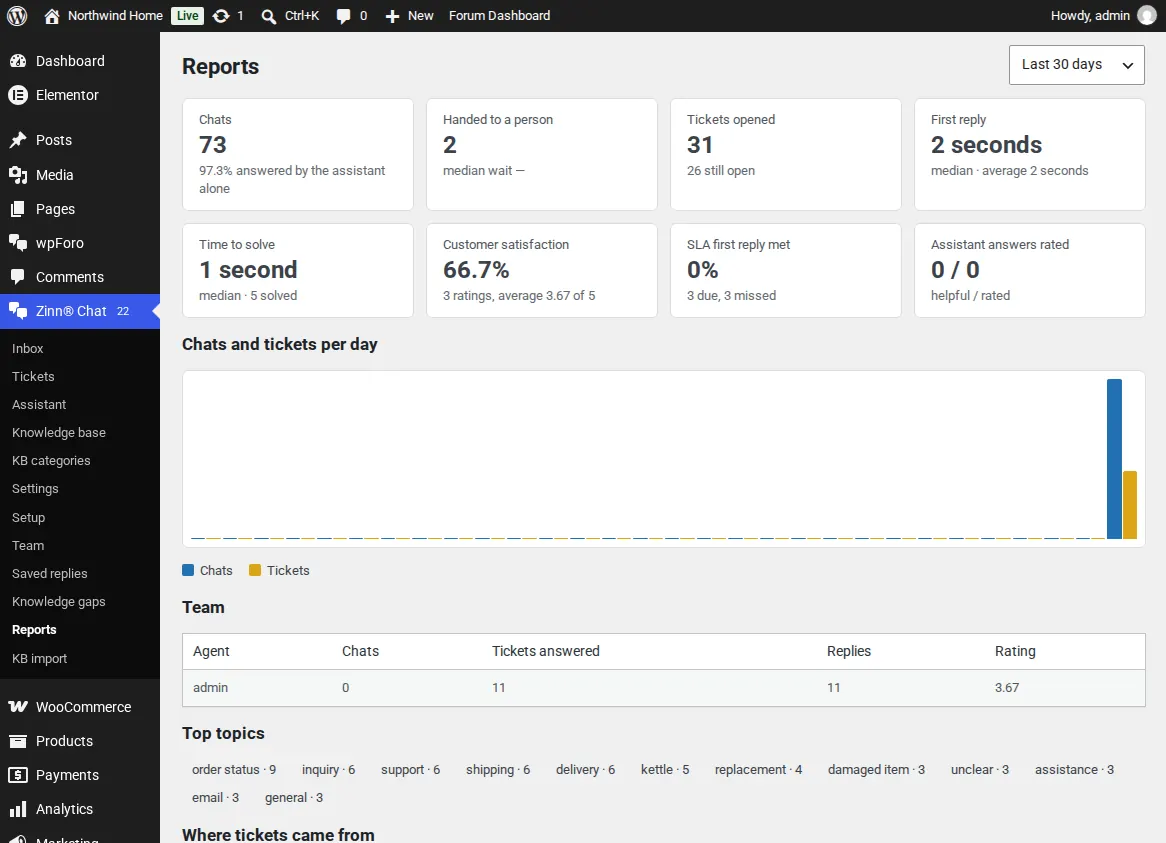
Open Zinn® Chat, Reports, and choose the last 7, 30 or 90 days or 12 months. You see chats, how many the assistant answered alone, hand-overs and waits, tickets, first reply and time to solve (median and average), satisfaction, SLA and the chats and tickets per day.
Customer ratings
When a ticket is solved, the customer gets one email asking them to rate the help from 1 to 5, with room for a comment. Ratings appear on the ticket and in the reports.
Each agent and each topic
The team table shows each agent's chats, tickets, replies and average rating. Top topics come from the AI's tags.
Switch the rating email off in Settings, Tickets and email.
Related guides
- Start Zinn® Chat Pro
- Add support agents, departments and the phone app
- Saved replies, suggested replies and summaries
- Business hours and SLA targets
- Let customers reply to tickets by email
- Slack, Teams, Telegram, push and webhooks
- AI persona, hand-off rules, triage and extra sources
- Find and fill knowledge gaps
- Build a knowledge base in WordPress
- Import an existing knowledge base
- Proactive chat messages
- White-label the help desk
- Zinn® Chat shortcodes: every shortcode and attribute
Included with Zinn Digital® hosting
Already installed on every WordPress site we host
The free Zinn® Chat plugin comes installed and activated on every WordPress site we host on our own servers, so a chat is one switch away. Premium is an upgrade, per site, when you need more.