 Zinn® Chat
White-label the help desk
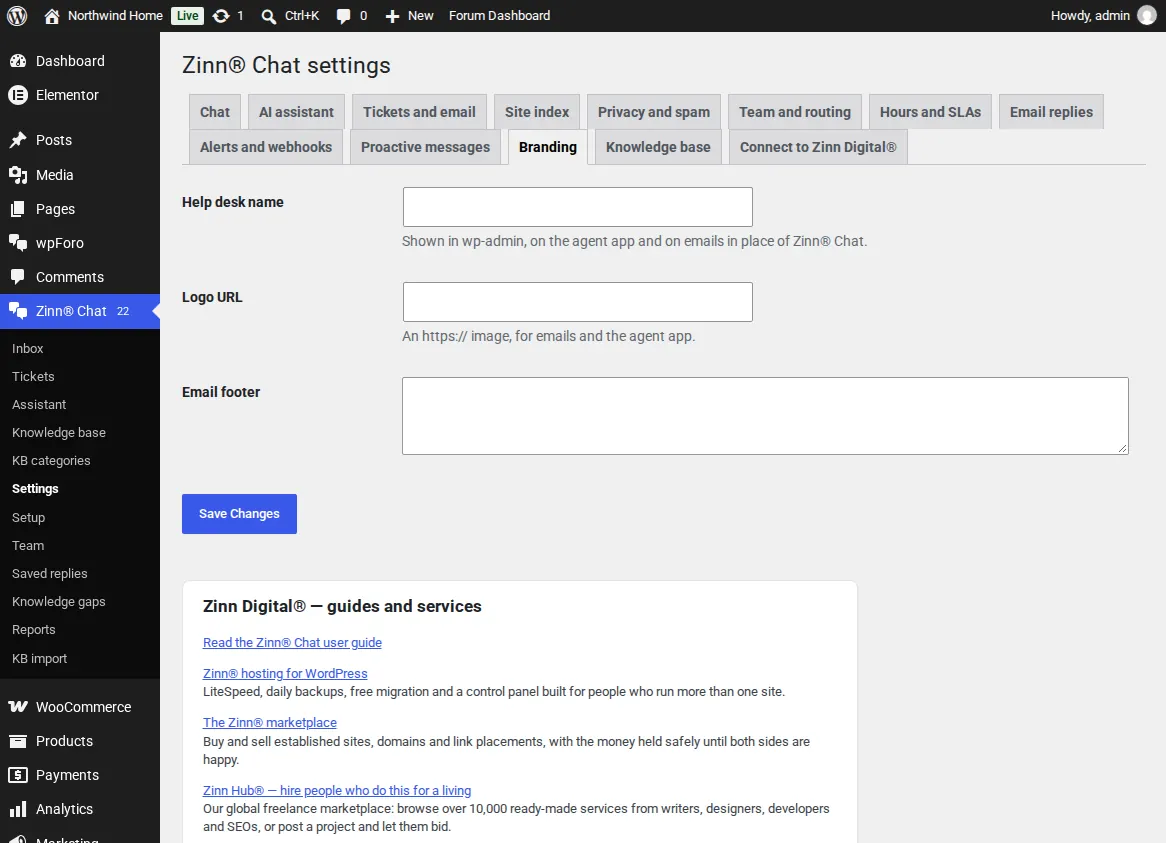
Your help desk name in wp-admin and on the agent app, and your logo and footer on every email.
Pro takes our name off the team's side of the help desk.
This guide is about Zinn® Chat Pro. Every Pro plan starts with a free trial.
Your name and logo
In Settings, Branding, enter the help desk name, a logo address and an email footer. The menu, the agent app and the emails use them.
Bot protection
In Settings, Privacy and spam, add Cloudflare Turnstile keys to check new chats and ticket forms for bots.
The free plugin never shows a credit to visitors unless you switch it on.
Related guides
- Start Zinn® Chat Pro
- Add support agents, departments and the phone app
- Saved replies, suggested replies and summaries
- Business hours and SLA targets
- Let customers reply to tickets by email
- Slack, Teams, Telegram, push and webhooks
- AI persona, hand-off rules, triage and extra sources
- Find and fill knowledge gaps
- Build a knowledge base in WordPress
- Import an existing knowledge base
- Proactive chat messages
- Help desk reports and customer ratings
- Zinn® Chat shortcodes: every shortcode and attribute
Included with Zinn Digital® hosting
Already installed on every WordPress site we host
The free Zinn® Chat plugin comes installed and activated on every WordPress site we host on our own servers, so a chat is one switch away. Premium is an upgrade, per site, when you need more.