 Zinn® Chat
Privacy, consent and spam protection
Consent before a chat, what is stored, retention, personal data requests, and the spam limits.
Zinn® Chat keeps chats and tickets in your own database and gives you the tools to meet privacy law.
Ask for consent
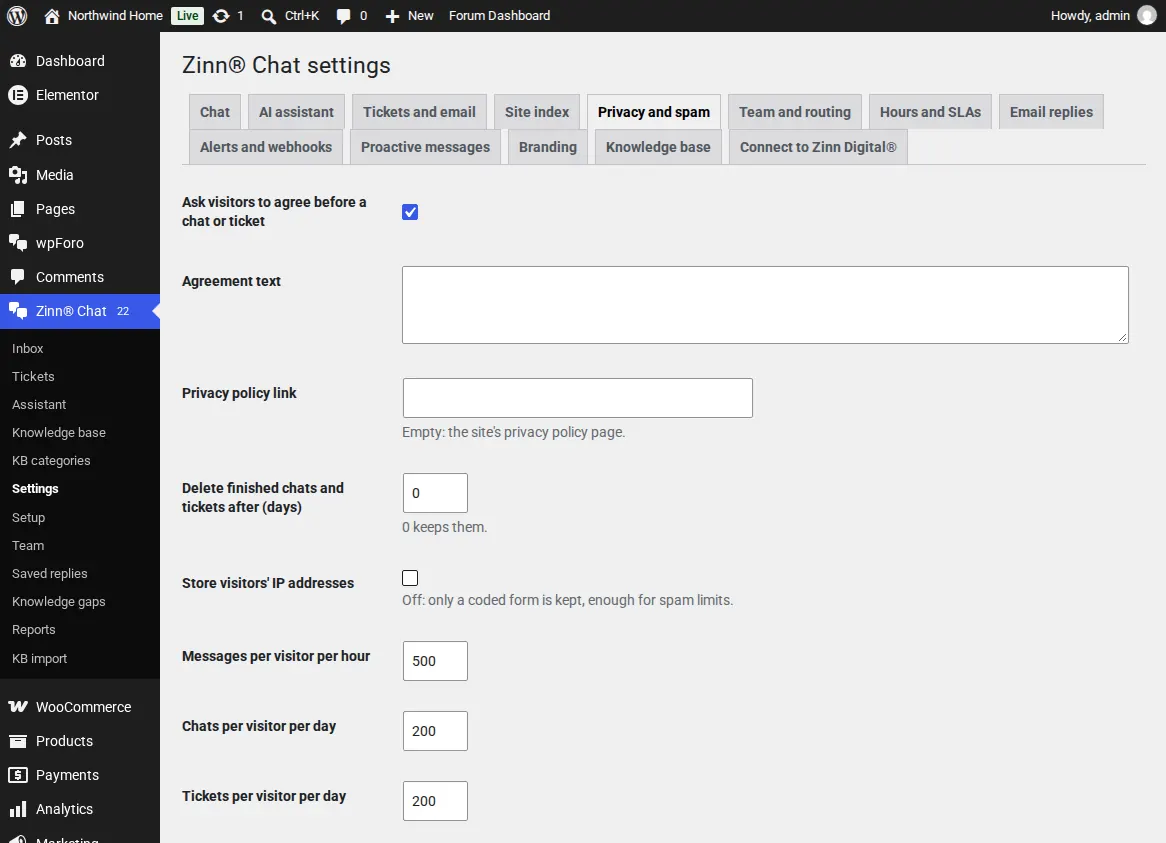
In Settings, Privacy and spam, visitors can be asked to agree before a chat or ticket, with your own text and a link to your privacy policy.
Keep only what you need
Delete finished chats and tickets after a number of days, and store only a coded form of visitors' IP addresses, enough for spam limits.
Export and erase
WordPress's own Export and Erase Personal Data tools include chats and tickets.
Stop spam
Set limits on messages per hour, chats and tickets per day and message length, and block IP addresses, emails, domains or words. A hidden field stops simple bots.
The limits also protect your AI bill: every visitor message is a request to your AI provider.
Related guides
- Install Zinn® Chat on WordPress and switch it on
- Set up the AI assistant and teach it your site
- Answer live chats in WordPress
- Support tickets, the support page and ticket emails
- WooCommerce: the Support tab and order questions
- Chat and support elements for blocks and page builders
- Zinn® Chat shortcodes: every shortcode and attribute
Included with Zinn Digital® hosting
Already installed on every WordPress site we host
The free Zinn® Chat plugin comes installed and activated on every WordPress site we host on our own servers, so a chat is one switch away. Premium is an upgrade, per site, when you need more.